Most MSPs did not set out to build a different remote-access stack for every client. It just happened one request at a time.
One customer already had a VPN in place, so the MSP kept it. Another needed an internal web app exposed to a few users, so a reverse proxy got added. Another had a vendor who needed temporary access, so somebody opened a rule or stood up a jump box. A year later, the MSP is supporting a pile of access patterns that all solve roughly the same problem in slightly different ways.
That is the real issue. MSPs are usually not missing access tools. They are carrying too many of them, and the inconsistency starts showing up everywhere: onboarding takes longer, support gets harder, technicians keep context-switching between clients, and users often end up with more access than the job called for.
The remote access problem is not the same for every user
Most client environments need two different things.
Some users only need a private web app. That might be an admin portal, an internal dashboard, a line-of-business application, or some other browser-based system that should stay private.
Other users need deeper access. MSP technicians, engineers, and vendors may need a specific host, service, or subnet behind the environment.
Those should not be treated as the same request. If a browser user gets a VPN because that is the default tool, they inherit client rollout and more network reach than they needed. If a technician workflow gets forced through whatever web-facing access pattern is already available, the MSP usually ends up with awkward exceptions that nobody likes maintaining.
Why MSP remote access stacks get messy
Messy access stacks are usually the result of small local decisions.
Teams add one more VPN because a client already uses it. They add one more reverse proxy because somebody needs a portal reachable. They keep one more firewall hole because removing it would take coordination. Each decision is understandable on its own. Together, they create a service model that is harder to scale.
At that point, the MSP is not really standardizing access. It is managing drift.
That drift has a cost:
support teams have to remember too many client-specific exceptions
onboarding a new customer takes more design work than it should
access reviews are harder because every environment is a little different
offboarding contractors and vendors gets riskier when access is scattered across tools
What a cleaner secure remote access model looks like
A better approach is to separate the browser path from the deeper private path and keep both inside one consistent system.
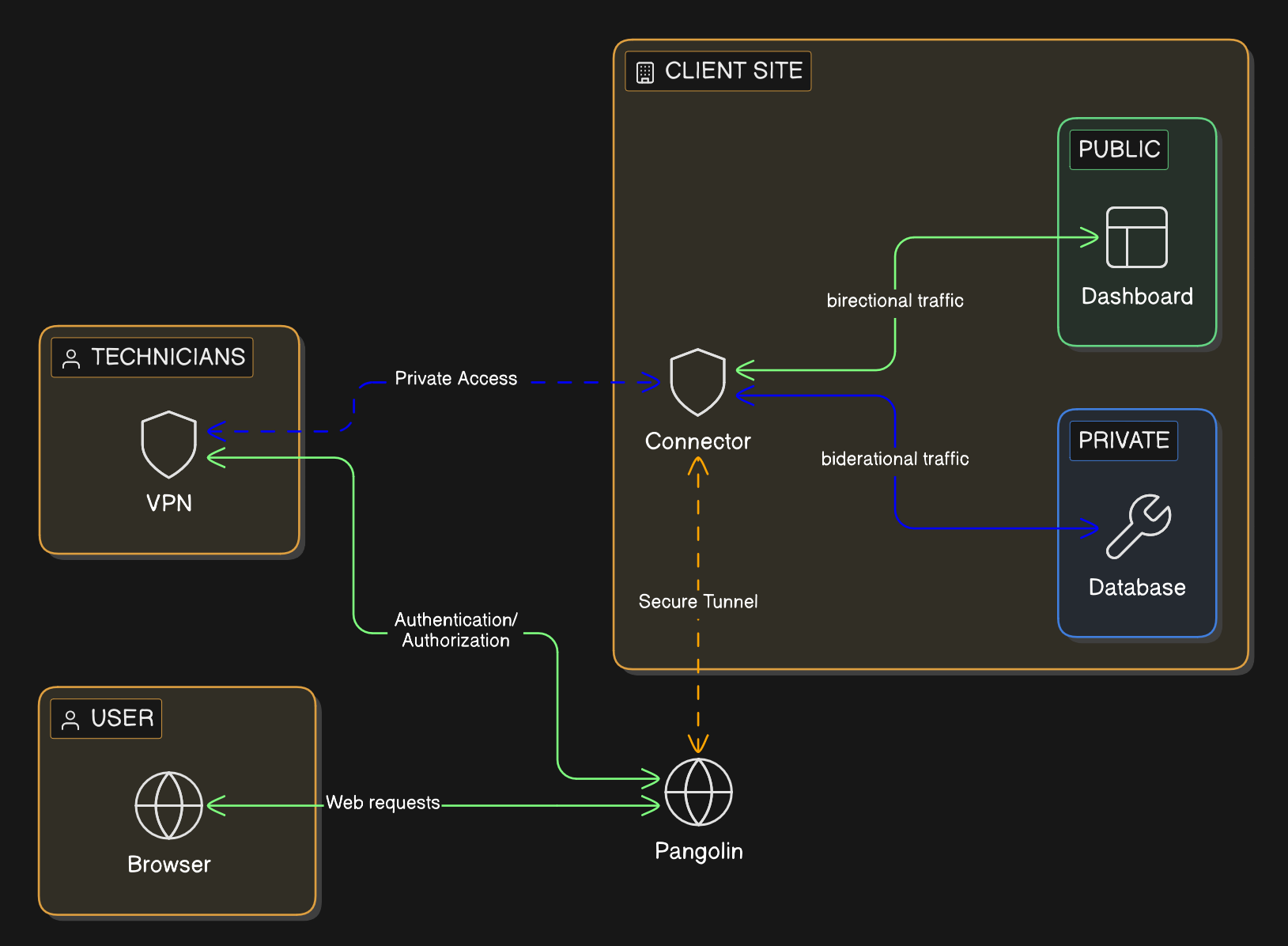
Browser users should get a managed hostname, HTTPS, and an authenticated front door in front of the private application. They should not need client software just to open a page.
Technicians and vendors who need deeper reach should get a narrower private path tied to the systems involved in the work. That keeps private connectivity available when it is needed without making broad network access the default answer for everybody else.
That model is easier for an MSP to run because it lines up with real jobs. Staff opening an internal app, a support engineer reaching an admin service, and a contractor connecting for a short maintenance window do not need the same access path.
Where Pangolin helps
Pangolin gives MSPs a way to run that split access model across many client environments from one platform.
Each client can be kept in its own organization with its own users, resources, and policies. That gives the MSP tenant separation without forcing it to support a different remote-access product for each customer. For the broader architecture, see How Pangolin Works.
For browser-based access to private applications, Pangolin uses Public Resources. The user connects through a managed hostname over HTTPS, authenticates first, and then reaches the backend service. The app stays private, and the user does not need a VPN just to open it in a browser.
For deeper workflows, Pangolin uses Private Resources. The MSP can grant access to the specific private target involved instead of dropping the user onto a broad section of the client network.
That gives MSPs a practical split:
browser users get the application they need without broad network access
technicians get the deeper path only when the job calls for it
vendors can be granted narrower access that is easier to review and revoke
clients stay separated without turning the MSP stack into a patchwork
Why that matters commercially
The best MSP platforms do not just improve security. They reduce operational waste.
If secure access can be delivered from one repeatable model, the MSP spends less time maintaining exceptions and more time running a service it can scale. That shows up in faster onboarding, cleaner support workflows, and a more credible story when clients ask how access is controlled.
Pangolin also gives MSPs something they can package more cleanly. Instead of selling a loose combination of VPNs, proxies, and special cases, the MSP can offer a standard access layer for private apps, technician workflows, and client separation. With Blueprints, that model can also become more repeatable across deployments.
Conclusion
Most MSPs do not need more remote-access products. They need fewer exceptions.
Pangolin gives them a cleaner way to handle private web access, deeper technician access, and multi-client separation from one operating model. That makes the security story tighter, but it also makes the service easier to deliver.
For MSPs, that is the point. Secure access should be something the team can standardize, not something it has to reinvent for every client.
FAQ
What remote access solution works best for MSPs?
The best fit is usually a model that separates private web access from deeper technician access. That keeps browser users out of unnecessary VPN workflows while still giving engineers and vendors the narrower private path they need.
How do MSPs stop every client from becoming a one-off remote access setup?
They standardize the access model instead of standardizing on a single blunt tool. If the same platform can handle private web apps, technician access, and client separation, the MSP can repeat that pattern across clients without rebuilding the stack every time.
Can an MSP give client staff secure browser access without installing a VPN?
Yes. If the job is opening a private web application, the cleaner design is an authenticated browser path with a managed hostname and HTTPS. The user signs in first and reaches the app without joining the full client network.
What is the right way to handle technician and vendor access for MSP clients?
Give them the specific private access path the work requires and avoid leaving behind standing broad network access. That keeps support practical while making offboarding and access review easier.
Why would an MSP use Pangolin instead of piling on more VPNs and proxies?
Pangolin gives the MSP one platform for private web access, narrower private connectivity, and tenant separation. That reduces tool sprawl and makes secure remote access easier to package as a repeatable service.
About Pangolin
Pangolin is an open-source infrastructure company that provides secure, zero trust remote access for teams of all sizes. Built to simplify user workflows and protect critical systems, Pangolin helps companies and individuals connect to their networks, applications, and devices safely without relying on traditional VPNs. With a focus on device security, usability, and transparency, Pangolin empowers organizations to manage access efficiently while keeping their infrastructure secure.

.avif)