Pangolin remote nodes are for teams that want Pangolin Cloud to run the control plane while they keep the traffic edge on infrastructure they control.
You keep ingress, TLS termination, relay-capable edge handling, regional placement, and bandwidth on your own hosting footprint without also taking on Pangolin’s database, DNS, certificate lifecycle, health monitoring, and failover coordination.
This is not full self-hosting, and it does not replace sites. It is a split deployment model: Pangolin Cloud runs the coordination layer, and your remote node runs the edge that receives and serves traffic. For the broader product model behind sites and resources, see How Pangolin Works.
Why use Pangolin remote nodes?
Pangolin Cloud is simpler to operate, but some teams do not want all traffic ingress and relay capacity to go through the cloud infrastructure.
Remote nodes solve that by moving the traffic edge onto infrastructure you choose while keeping the hard coordination work in Pangolin Cloud.
That usually matters for a few reasons:
you want TLS termination and public ingress on infrastructure you control
you want a point of presence closer to users or workloads
you want more control over relay placement for private-resource fallback traffic
you expect sustained traffic and want to spec the bandwidth requirements of the edge yourself
you want Pangolin-managed high availability, load balancing, and failover without fully self-hosting Pangolin
What is a Pangolin remote node?
A remote node is a self-hosted Pangolin edge managed by Pangolin Cloud.
In practice, the node runs the following components:
pangolin-node, which keeps the node connected to Pangolin Cloud and applies edge configuration
Gerbil, which handles WireGuard tunnel and relay behavior
Traefik, which handles HTTP(S) routing and TLS termination
This is the part of the system where traffic lands. Browser traffic for public resources can terminate here. Tunnel traffic can terminate here. Relay traffic can pass through here when a direct peer-to-peer path is not available between clients and sites.
That is why a remote node is lighter than full self-hosting. You are running the traffic edge, not the whole platform.
What runs on a remote node, and what Pangolin Cloud still manages
Remote nodes make the most sense once you separate the control plane from the data plane.
Pangolin Cloud stays responsible for the control plane:
the dashboard and API
configuration state for sites, resources, domains, and policies
certificate issuance and renewal
DNS answers for Pangolin-managed hostnames
node health monitoring
failover decisions
synchronization of routes and edge configuration
Your remote node is the data plane:
it receives and serves traffic on your infrastructure
it uses your network path and bandwidth
it terminates tunnels and HTTPS sessions
it can relay traffic when clients cannot establish a direct path
That split is the whole point. You get control over where traffic runs without taking on the operational burden of the supporting control-plane stack.
Do remote nodes replace sites?
Remote nodes do not replace sites, or the site connector (often called Newt). The connector is still the site that links a private network back into Pangolin. Sites still define where resources live. Access is still granted at the resource layer.
Remote nodes change where the Pangolin traffic edge runs.
That means the system still works through the same core model:
sites connect private networks into Pangolin
resources define what users are allowed to reach
remote nodes receive and serve traffic at the edge
Pangolin Cloud coordinates the system around them
If someone is trying to understand remote nodes as “the new thing that replaces Newt,” they are using the wrong frame.
How remote nodes work with public and private resources
Remote nodes matter for both public and private traffic, but not in the same way.
For Public Resources, the remote node acts as the front door. It can terminate HTTPS, route requests, and serve traffic from infrastructure you control instead of from Pangolin Cloud’s shared edge.
For Private Resources, the remote node is not the site connector and not the resource itself. Private resources still depend on the site layer behind the connector. What the remote node changes is where relay-capable edge handling can happen when direct peer-to-peer connectivity is not available.
In practice:
for public resources, remote nodes directly affect where user-facing web traffic lands
for private resources, remote nodes affect fallback and relay behavior, not the basic site model
Use this mental model: public traffic can terminate on the remote node, while private traffic still relies on sites and clients, with the remote node helping when relaying is needed.
Why remote nodes need Pangolin-managed DNS
Remote nodes only deliver clean failover if Pangolin can move traffic between edges without forcing you to change the public hostname manually.
That is why Pangolin needs authority over resource DNS for remote-node deployments. If you pin a hostname to one remote node with a static A record, you lose most of the operational benefit of Pangolin-managed failover. The hostname now points at one IP, and recovery depends on manual DNS changes and resolver cache timing.
For remote nodes, Pangolin needs to be able to:
move a hostname between remote nodes
fail traffic over from a remote node to cloud infrastructure
keep the same public hostname while the serving edge changes
manage certificate validation records
The practical rule is simple: if you want Pangolin-managed HA, do not point resource hostnames directly at a remote node IP with a static A record.
Use a Pangolin-controlled DNS path instead:
delegate a domain or subdomain with NS records when Pangolin should manage that resource namespace
use a CNAME when you want to keep your main DNS provider and let Pangolin control the final destination for a hostname
Why remote nodes are easier than full self-hosting
The strongest reason to use remote nodes instead of full self-hosting is that Pangolin Cloud keeps the coordination work off your plate.
In a fully self-hosted high-availability deployment, you are not just running edge services. You are also responsible for the systems around them: persistent state, DNS, certificate coordination, health checks, node synchronization, and the logic that lets one edge take over cleanly from another.
With remote nodes, Pangolin Cloud handles that layer for you.
That means:
no hand-managed certificate copying between edges
no manual reverse-proxy sync across nodes
easier node replacement when an edge needs to be rebuilt
cleaner failover because the standby edge already has the right hostname and routing state
ability to run more than one Pangolin instance with a shared dashboard and backend
That is the real difference between running some traffic handling yourself and running the whole platform.
How remote-node failover works
Remote nodes are most useful when you think about them as part of a coordinated edge system, not as a single server with cloud branding.
If you run multiple remote nodes, Pangolin can move traffic between them when one node becomes unhealthy. The destination node already has the configuration and certificate state it needs to serve the same hostname, so failover does not depend on rebuilding the edge first.
Pangolin can also fail traffic over from your remote node to cloud infrastructure. That gives you a useful operating model: keep traffic on your own edge during normal operation, but avoid a hard outage when your self-hosted edge is unavailable.
That fallback is one of the reasons DNS control matters so much. Pangolin can only move traffic cleanly if it can move the hostname.
Remote nodes vs full self-hosting
These options sound close, but they solve different problems.
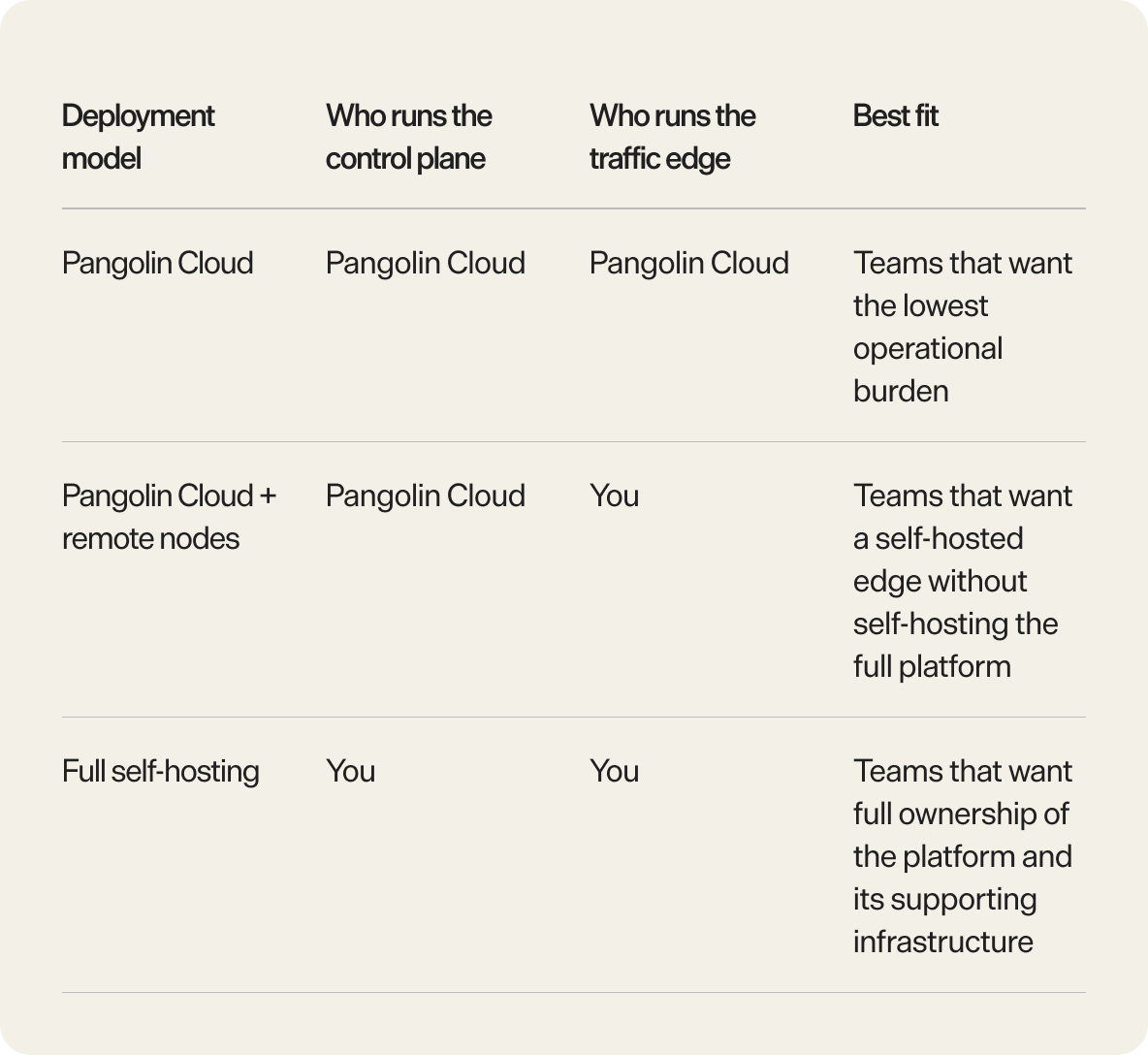
With a remote node, you run the edge and Pangolin Cloud runs the coordination layer. With full self-hosting, you run both.
Remote nodes are the better fit when you want:
a self-hosted edge with hosted coordination
regional or provider-specific edge placement
Pangolin-managed DNS, certificates, and failover
less operational complexity than a full HA self-hosted deployment
Full self-hosting is the better fit when you want:
complete ownership of the control plane as well as the edge
self-managed DNS and certificate workflows
self-managed database and coordination layers
full responsibility for HA design and maintenance
The mistake is treating remote nodes as a halfway marketing term for self-hosting. They are a specific split: self-hosted traffic edge, hosted control plane.
Which deployment model should you choose?
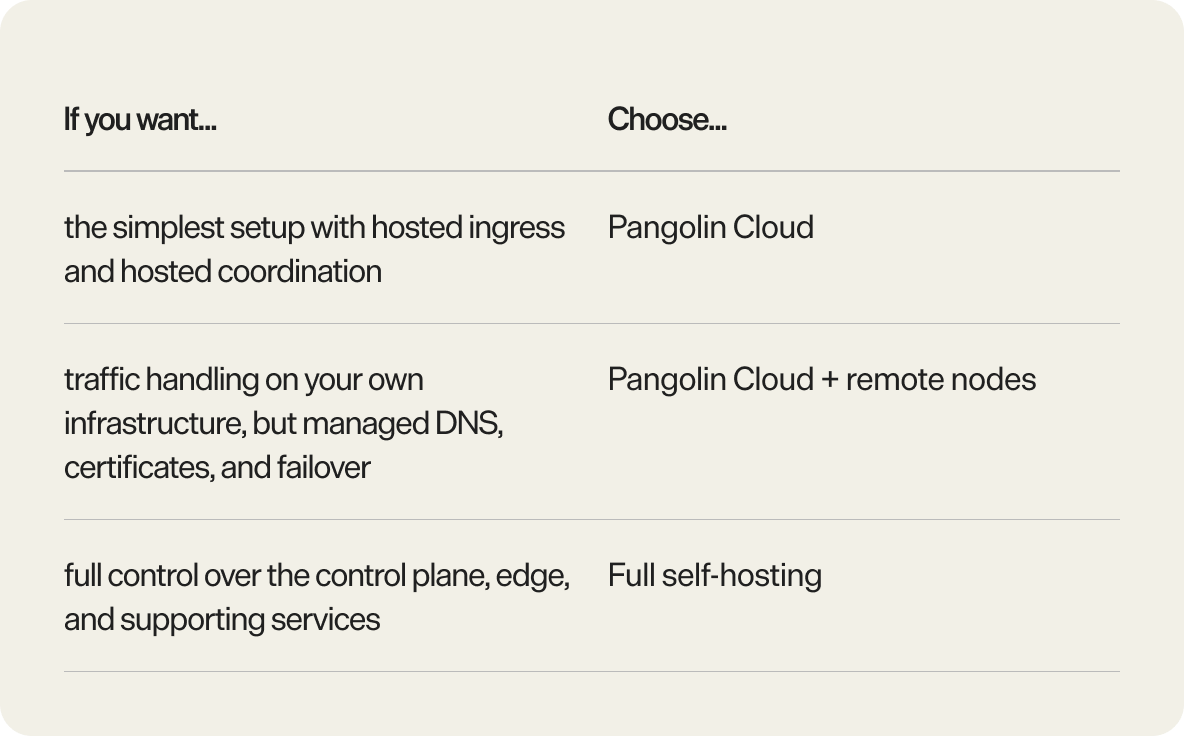
Use this as the quick decision version:
When to choose a Pangolin remote node
Choose a remote node when Pangolin Cloud is the right operating model overall, but you want more control over where traffic is handled.
That is usually the right call when:
your team wants hosted coordination but self-hosted ingress
you need regional edge placement for users, workloads, or compliance
you want TLS termination on infrastructure you control
you want your own hosting footprint to carry relay-capable traffic
you want failover and HA without building the full control-plane stack yourself
If Pangolin Cloud already meets your traffic-handling requirements, you may not need remote nodes. If you want to own the entire platform end to end, remote nodes are also not the final step. Full self-hosting is.
Conclusion
Remote nodes let you keep the Pangolin traffic edge on infrastructure you control without forcing you to self-host the control plane behind it.
That gives you a cleaner middle ground between plain Pangolin Cloud and full self-hosting. You keep control over ingress, relay-capable edge placement, and traffic capacity. Pangolin Cloud keeps the DNS, certificates, health monitoring, and failover machinery that make the system practical to run.
If that is the deployment tradeoff you want, remote nodes are the right model.
What are Pangolin remote nodes? Pangolin remote nodes are self-hosted traffic edges managed by Pangolin Cloud. They allow you to run tunnels, TLS termination, and traffic handling on infrastructure you control, while Pangolin Cloud manages DNS, certificates, health checks, and failover.
Do Pangolin remote nodes support high availability? Yes. Pangolin remote nodes enable high availability by allowing Pangolin Cloud to coordinate traffic routing and automatic failover between nodes or to cloud infrastructure.
Do remote nodes replace Newt? No. Newt still connects sites into Pangolin. Remote nodes only change where the traffic edge runs, not how sites connect or how resources are defined.
What runs on a Pangolin remote node? A Pangolin remote node runs pangolin-node, Gerbil, and Traefik. Together, these components handle edge connectivity, WireGuard tunnel and relay behaviour, HTTP(S) routing, and TLS termination.
Why does Pangolin manage DNS for remote nodes? Pangolin manages DNS to support seamless failover and routing. This allows a resource hostname to move between remote nodes or fall back to cloud infrastructure without changing the public URL. Using static A records removes this flexibility and breaks failover.
Are Pangolin remote nodes only used for public resources? No. Remote nodes primarily handle public resource traffic, but they also play a role in private resource relay when a direct peer-to-peer connection cannot be established.
When should you use remote nodes instead of full self-hosting? Use Pangolin remote nodes when you want a self-hosted edge without managing the full control plane. Full self-hosting is a better fit if you need control over the database, DNS, certificate workflows, and high availability coordination.
Can Pangolin fail over between remote nodes? Yes. Pangolin supports automatic failover between remote nodes and can also route traffic from a remote node to cloud infrastructure when configured as a fallback.
About Pangolin
Pangolin is an open-source infrastructure company that provides secure, zero trust remote access for teams of all sizes. Built to simplify user workflows and protect critical systems, Pangolin helps companies and individuals connect to their networks, applications, and devices safely without relying on traditional VPNs. With a focus on device security, usability, and transparency, Pangolin empowers organizations to manage access efficiently while keeping their infrastructure secure.