Pangolin is a remote access and management solution designed for the edge. Its site- and resource-based architecture is purpose-built for servicing large fleets of IoT devices. This guide demonstrates how Pangolin can be deployed in an automated, templated, and consistent manner across a global fleet.
Why Is Device Provisioning Difficult?
Provisioning remote access to edge devices is traditionally a complex, manual process. Standard workflows often require writing intricate scripts to interact with APIs, generating unique credentials or certificates for every individual device, and securely distributing those keys to remote hardware.
Once an agent is running on the device, you typically face a second hurdle: configuring the service. This involves either more API scripting or manually clicking through a dashboard to define SSH access, IP addresses, users, and Role-Based Access Control (RBAC).
For hundreds or thousands of devices this is brittle and hard to scale. Even worse, there isn’t a single source of truth.
The Power of Automated Rollouts and Templated Deployments
When managing edge devices at scale, a consistent rollout is essential. Manual configurations lead to configuration drift, increased operational costs, and security gaps. Templated deployments ensure every device is provisioned with a verified and uniform configuration.
A single image with templated variables enables you to create a “golden image” so new deployments are predictable and don’t require manual setup. Changes to edge configurations can be pushed and applied automatically and declaratively, ensuring the local configuration remains the source of truth.
Pangolin simplifies this through Provisioning Keys and Declarative Blueprints. These tools allow you to use existing orchestration pipelines (like Ansible or Puppet) to deploy identical configuration files across your fleet without custom scripting.
Create the Provisioning Key
Typically, a Pangolin site connector (known as Newt) requires a unique ID and Secret to authenticate. Generating these individually for thousands of devices is inefficient.
Provisioning Keys solve this by acting as a temporary handshake. When Newt starts for the first time, it exchanges the provisioning key for a permanent, unique ID and Secret. It then overwrites its own configuration file, wiping the provisioning key from the disk. This ensures that even if a device is later compromised, the original key is gone and the device possesses its own isolated credentials.
To set this up:
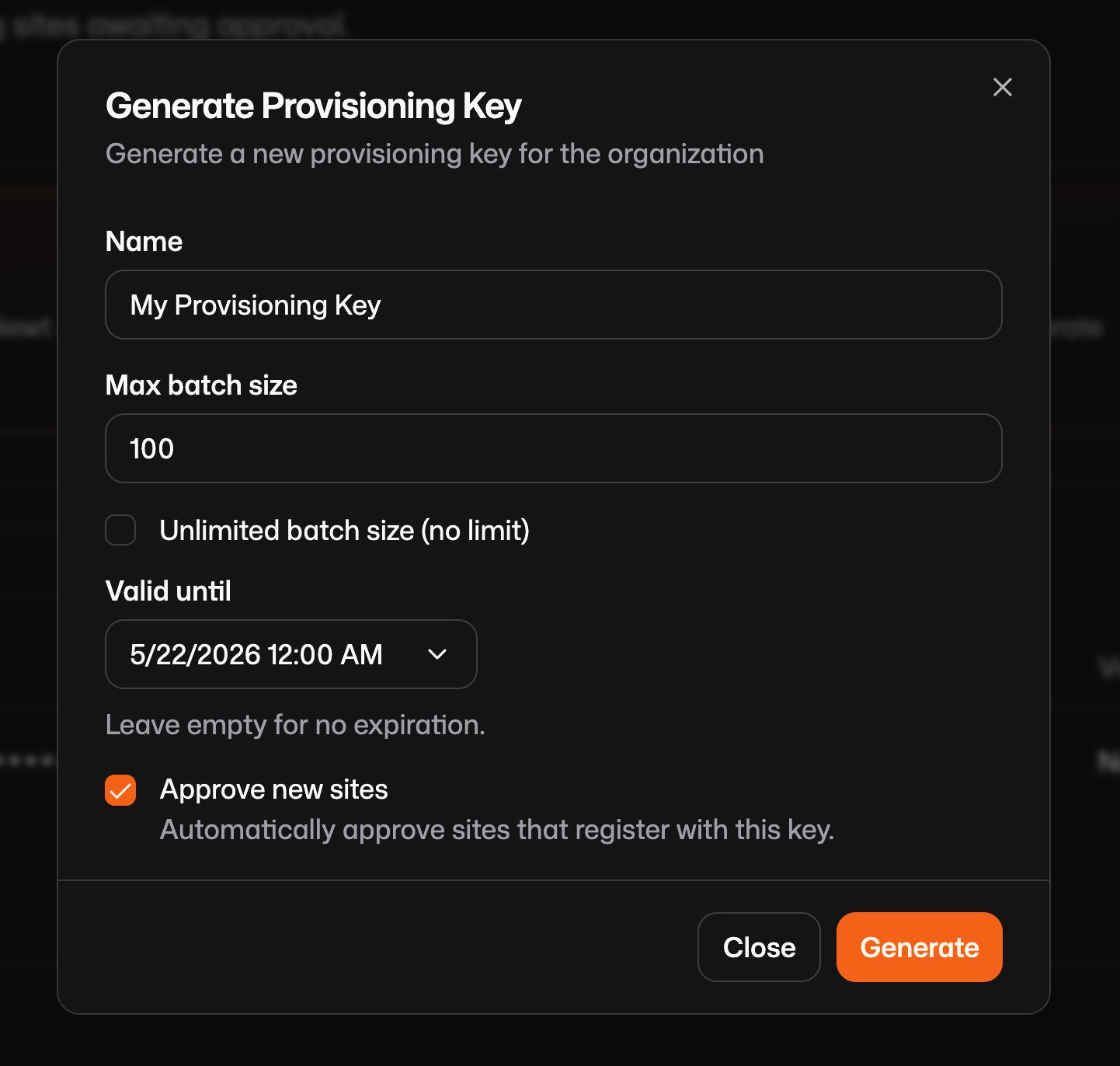
Navigate to the Pangolin Dashboard > Management > Provisioning.
Generate a new key.
(Optional) Set security constraints, such as an expiration date (e.g., one week) or an activation limit (e.g., 50 uses).
Create a /var/config.json file that looks like this on your device and include the key you just generated:
When creating a provisioning key, you will notice an Approve New Sites checkbox. When enabled, any new site created using that key is automatically added to your production site table. If disabled, new sites are placed in a "pending" state which is essentially a waiting room that requires an administrator to manually review and approve or reject the connection before it moves into production. This adds an extra layer of security for high-trust environments.
Create the Blueprints
Getting a device online is only the first step. Blueprints eliminate the need to manually configure resources (like SSH or Web access) in the dashboard.
Blueprints are a declarative YAML file that defines exactly what resources should exist and how they should be configured on that device. You define Pangolin resources (public or private) for this device and include roles or users that should have access. You can use environment variables like {{env.SERIAL_NUMBER}} so that each device dynamically names its own resources or domains for easier management later.
Reference the blueprint documentation to create a file for you, but this is a simple example https://docs.pangolin.net/manage/blueprints. Create the blueprint in /var/blueprint.yml:
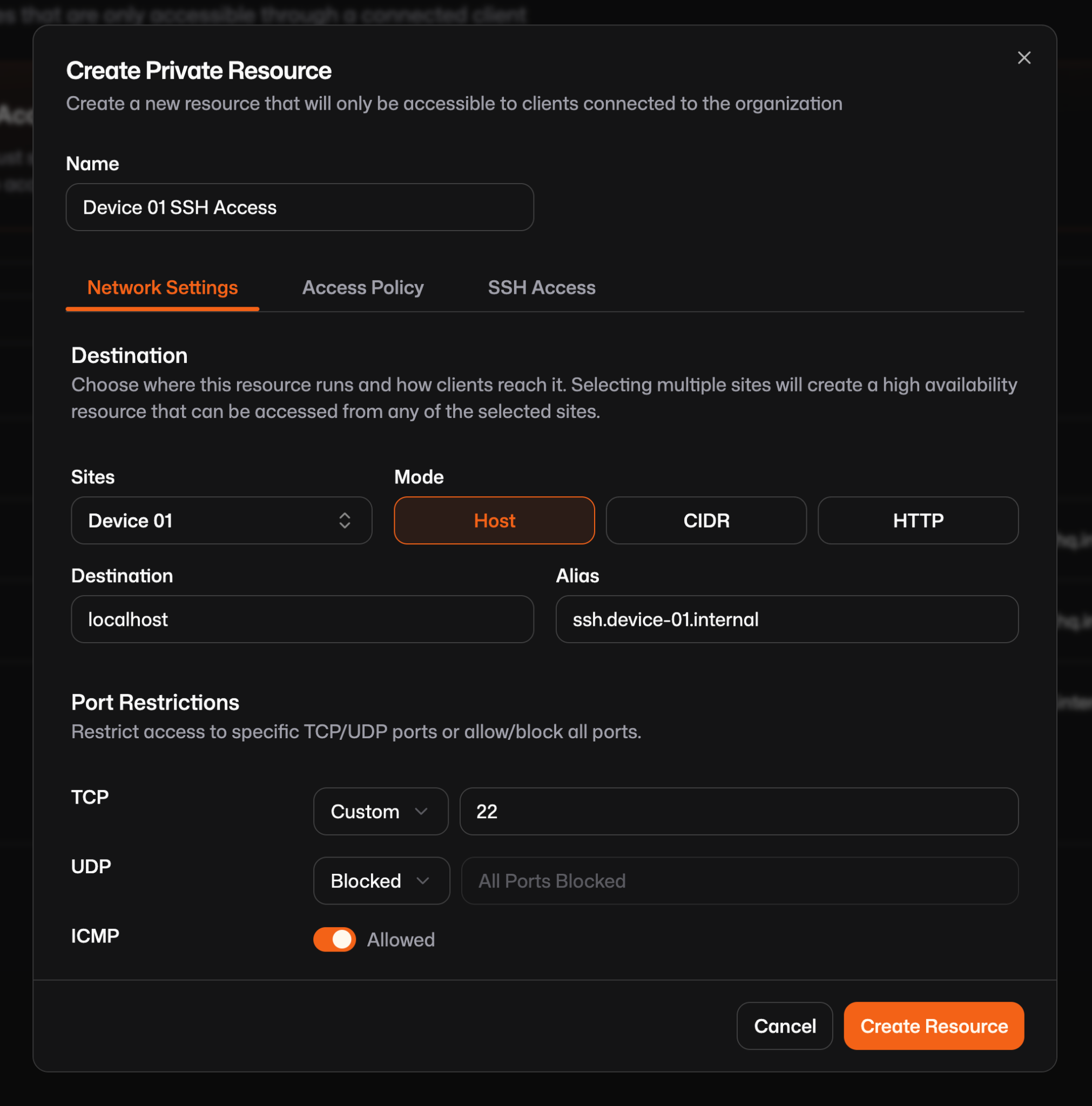
When provisioned, this blueprint will create a resource like this:
A couple notes about using blueprints this way:
Usually when using blueprints to define resources you must define the sites on each so Pangolin can route to the right device, but when a blueprint is applied via Newt, the local site is automatically assigned to the resources, removing the need to define site IDs manually.
Pangolin gives you two ways to manage these configurations long-term:
Provisioning Mode: Use --provisioning-blueprint-file. The device sets itself up once, and then you can make manual tweaks in the dashboard that won't be overwritten.
Continuous Sync: Use --blueprint-file. This makes the device the "source of truth." If you need to change the SSH ports across 500 devices, you just push an updated YAML file to them. newt watches that file, detects the change, and updates the Pangolin cloud immediately.
Deploy via systemd
Finally, we need a way to run newt, the site connector. Systemd is a good option because it is easy to push out using tools like Ansible or Puppet. You should deploy the exact same service file and config to every device in your fleet (that's configured the same) then start the systemd service. When newt runs for the first time it will trigger the provisioning and connection process.
Either push the Newt binary directly to /usr/local/bin or download it with:
The environment variables HOSTNAME and SERIAL_NUMBER should be available to the binary via environment variables in the systemd service so that newt can inject them. If you are not using interpolation this is not required.
Wrapping Up
Pangolin simplifies the complex and typically brittle process of provisioning remote access to edge devices using provisioning keys and blueprints. By creating a temporary provisioning key that the Newt site connector exchanges for a unique permanent ID and secret upon first run and defining resources and access controls using declarative YAML blueprints you eliminate the need to script against the service API. Deploying the Newt connector using a systemd service file is easy and allows a single configuration to be deployed across thousands of units using existing pipelines like Ansible or Puppet.
About Pangolin
Pangolin is an open-source infrastructure company that provides secure, zero trust remote access for teams of all sizes. Built to simplify user workflows and protect critical systems, Pangolin helps companies and individuals connect to their networks, applications, and devices safely without relying on traditional VPNs. With a focus on device security, usability, and transparency, Pangolin empowers organizations to manage access efficiently while keeping their infrastructure secure.