At first glance, remote access to Tridium Niagara can seem simple. It is a web interface with an address and a port, so the first question is how can we provide remote access. This usually means giving someone access to alarms, graphics, schedules, or Niagara Workbench. Most teams do that with either port forwarding or a VPN. Both work, but both come with tradeoffs. This article looks at those approaches and then at a more secure model that avoids open ports.
Tridium Niagara remote access needs two paths
Before looking at access methods, it helps to separate the two access needs most teams are trying to support.
Routine access is for users who need to check alarms, graphics, schedules, or general system status. In most cases, access to the Niagara interface is enough. Usually, you don’t want these users to install client-side software, so instead they should be able to access from any web browser as long as they can pass the authentication portal.
Some users, like engineers, need direct connectivity to systems on the network. For example, they might need to connect desktop (thick client) software to devices on the LAN or run commands while they are remote. These users can install client side software to establish scoped tunnels to the remote networks.
How Tridium Niagara remote access is usually approached
Most teams do not build separate access paths for those two needs at the start. They pick one method and try to make it cover everything.
When a user needs access to an application, the first thought is often to open a port on the firewall and forward it to the application. It is familiar, direct, and usually the fastest way to get someone connected, especially when the immediate goal is simply to make the interface reachable. This means users anywhere in the world go to <your-public-ip>:<inbound-port> to access the downstream service.
The second method is to use a VPN. Instead of publishing the application itself, the user connects to the remote network with VPN software first and then reaches Niagara from inside that private connection. It is more secure than port forwarding because the user has to authenticate before they can access the remote network. It also feels like a more complete answer when teams know some users will need deeper access, not just the web interface. VPNs usually grant broad network access to the entire remote network.
Why port forwarding and VPNs fall short
Port forwarding may solve access quickly, but it often introduces ongoing operational burden and unnecessary risk such as information exposure. You need to set up your firewall to open an inbound only port to a device on your network. You also need a public IP address. This creates a direct open path to the application on the open internet, and many applications are not designed to be exposed safely. Additionally, you have to remember the <IP>:<port> combo, when it’d be more convenient, instead, to have a friendly domain name of your choice with an encrypted HTTPS connection.
VPNs avoid some of that exposure, but they add their own complexity. You have to distribute keys or certificates to your users so they can connect from their own computers which gets complicated as your user-base grows. Keys are long-lived, and if lost or stolen can grant an unwanted user access. They’re hard to revoke when a user leaves the organization, and VPNs most often provide broad network wide access to every device meaning users can access more than just what you want them to.
How to provide Tridium Niagara remote access without open ports
A cleaner approach is to establish an outbound connection from the environment where Niagara is hosted and put the web UI behind an authenticated access layer. That gives browser based access to the interface without directly exposing the environment to the internet, and users must log in first.
Engineers and integrators who need Workbench or other non-browser tools can still be given private connectivity, much like a VPN, but with policy enforcement that limits access only to specific hosts (IPs) on the network. Ideally, scope access down to specific ports.
Reference architecture for Niagara remote access
A practical deployment looks like this:
The Niagara server, station, or controller remains on a private network with no public inbound exposure. No publically open ports.
An outbound only connector or tunnel establishes the private path from the building’s network, rather than relying on inbound internet access.
The web UI is published with a domain name and HTTPS through an authenticated access portal that proxies traffic to the application port.
Users who only need browser access are given that path and nothing broader. They don’t have to install client-side software.
Engineers and integrators who need direct connections to the network are given authenticated connectivity only to the exact hosts they require. They aren’t given access to the entire network unless you give explicit permission.
Every instance of access is tied back to a user’s identity for better control, auditability, and maintainability. Contractor access remains narrow and time-bounded rather than becoming a permanent network entitlement. It becomes easy to manage users, network resources, and access controls in a single pane of glass.
This model lines up more closely with how BAS teams actually work as it's easier to grant access to the user role and job requirements.
Where Pangolin fits
Pangolin supports both sides of the Niagara remote access model. In Pangolin, you define a site. A site is the remote building network you need access to. Then you install a software connector on any Windows or Linux machine in the network.
The connector creates an outbound tunnel that both tunnels out the Niagara web UI for browser-based access and provides scoped VPN-like access to specific IPs and ports when direct connections are needed to the remote network.
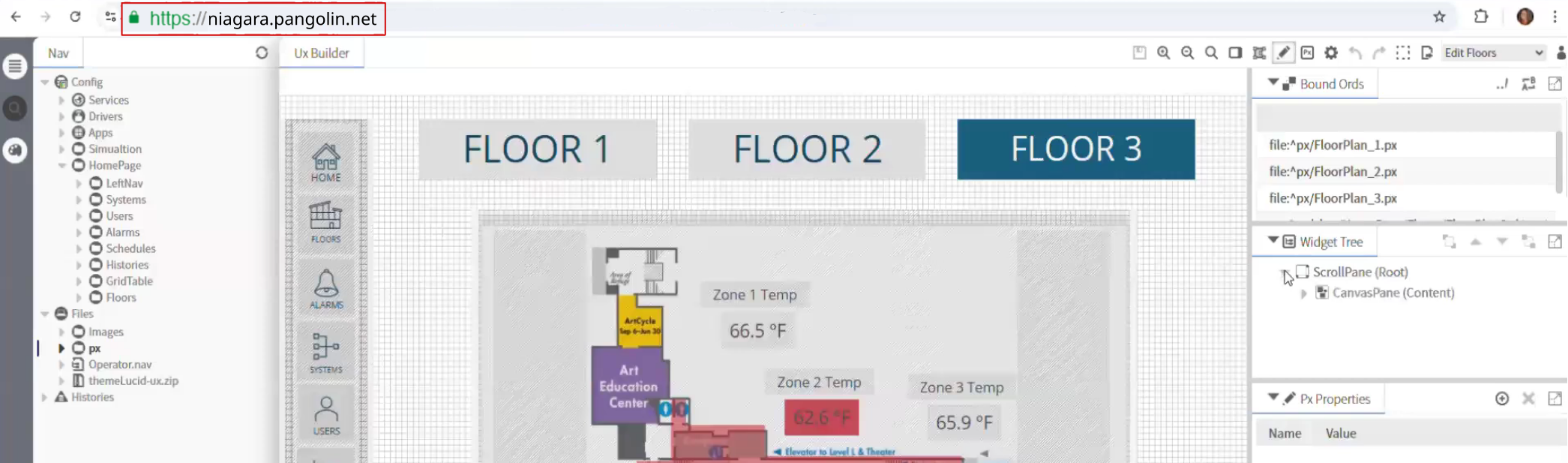
For the Niagara web UI, Pangolin can sit in front of the private web applications as an authenticated access layer using Public Resources. Users must authenticate and connect through a domain name (URL) of your choice and an HTTPS connection Any user with a web browser can access the authenticated web portal meaning they don’t need to install any client side VPN software. Authentication happens before the request reaches the backend, meaning the service stays private.
For Workbench and other engineering workflows, Pangolin can provide private, resource-scoped connectivity through Private Resources, without relying on public exposure or broad VPN access. Use Private Resources when you need access to a specific IP/host or subnet on a remote network. Users must download client side software and authenticate with their identity. The administrator gives the user access to specific IPs and ports, called resources, on the network of the connector, so access remains scoped down to the port level.
Pangolin does not force every Niagara use case through one blunt remote-access method. It gives BAS teams a cleaner and more controlled way to apply the right access path to each workflow. It has the best of both worlds, browser based access with an authentication portal for simple access, and client based access for when direct connections are needed. Both of these replace your legacy VPN and help you close down inbound ports.
Conclusion
Most Niagara remote access problems are really access design problems. The issue is not just how to connect users, but how to give each user the right level of access without exposing more than necessary.
Separating web access from direct connectivity access leads to a cleaner and more secure design. Keep Niagara private, put the interface behind an authenticated front door, and reserve deeper connectivity for engineers, integrators, and tools that genuinely need it while keeping it scoped.
That is the more maintainable way to handle Tridium Niagara remote access without relying on open ports.
FAQ
Can you provide Tridium Niagara remote access without opening inbound ports?
Yes. Keep Niagara on private networks, publish the interface through an authenticated access layer, and use private connectivity only for the workflows that need deeper reach.
Is a VPN still useful for Niagara Workbench?
Sometimes. Some engineering workflows still need private connectivity. The point is to stop making that the default for everyone.
What is the safer way to expose the Niagara web UI remotely?
Do not expose it directly. Keep it private and place an authenticated front door in front of it so identity is checked before traffic reaches Niagara.
Should the Niagara web interface and Workbench use the same remote-access method?
Usually no. They are different workflows with different risk and connectivity requirements.
Where does Pangolin help in this architecture?
Pangolin can protect the private web interface behind an authenticated front door and provide narrower private access for engineering workflows.
About Pangolin
Pangolin is an open-source infrastructure company that provides secure, zero trust remote access for teams of all sizes. Built to simplify user workflows and protect critical systems, Pangolin helps companies and individuals connect to their networks, applications, and devices safely without relying on traditional VPNs. With a focus on device security, usability, and transparency, Pangolin empowers organizations to manage access efficiently while keeping their infrastructure secure.